
Traillink
Traillink is the digital product arm for the non-profit organisation Rails to Trails Conservancy, based in the US. The app and website are designed to help people find local trails, that include converted abandoned train lines, for all sorts of activities: from walking, running and biking, to snowmobiling, horseriding, ATVs and more. As this app has yet to release, this is a limited case study...
THE CONTEXT & OBJECTIVES
It had been nearly a decade since TrailLink had made any major improvements to their trail search and map experiences. Making these these journeys more engaging were key to prompting users to upgrade their subscriptions.
I was brought in to assess the user feedback and data they had and spearhead other UX and research activities to help inform a product strategy and UX perspective on how to improve these areas.. They wanted to catch up with competitors and also put their unique twist on how to encourage people to enjoy getting outdoors with the app.
Objectives:
- Keep up with commercial competitors (with far more money and employees!) - improve information visibility / consistency and overall product functionality in order to maintain and increase overall user engagement.
- Create a future framework to improve personalisation and UGC, while helping to create a TrailLink community (long term) in help boost uptake and retention of paid tier subscriptions.
PROBLEMS AND OPPORTUNITIES
The opportunities / problems
- Refine the search journey to improve search results relevancy in areas including:
- Helping users to find the right trails for specific activities
- Provide more accessibility related results
- Provide better/more info on ammenities both on and near trails
- Showcase additional data points that could be used for personalisation in the future
- Improve the map functionality, specifically on apps by differentiating it from the web version based on user feedback highlighting how they were using the apps to:
- Get directions to the trail and trail head in real time
- To use the app while on the trail to find information about ammenities, scenic areas, end points, trail routes, connecting trails, etc. while on the trail
THE SET UP
- My role: Hands-On Product Manager & UX Designer
- Company: TrailLink
- Main Team: Myself, CTO of TrailLink, CPO, social media coordinator, content managers, UI designer, tech reps from their development partners
For this project, I worked closely with the CTO of TrailLink, whom I had worked with before 12 years prior. Collaboration with the tech team was limited due to the relationship set up with TrailLink, interaction with the UI designer was sporadic - mostly my updating him on the direction of the new journeys.
THE OLD TRAILLINK APP

PRODUCT & UX RELATED ISSUES
- UX and interface had not been updated for over a decade and needed a refresh overall - aspects of the layouts where awkward or inefficient for the amount of data it relayed during a trail search
- Users couldn't find some key content and functionality in the maps area (e.g. parking, amenities, connecting trails, offline maps)
- Subscription features with search results and maps were not obvious - users either didn't know they existed, didn't realise they need subscriptions, or didn't understand which extra features their subscription was paying for (all impacting subs uptake and renewal)
- Searching for relevant trails was cumbersome, confusing and less targeted than other competitor apps, especially for filtering and search results display
THE PROCESS
Heuristic and data analysis
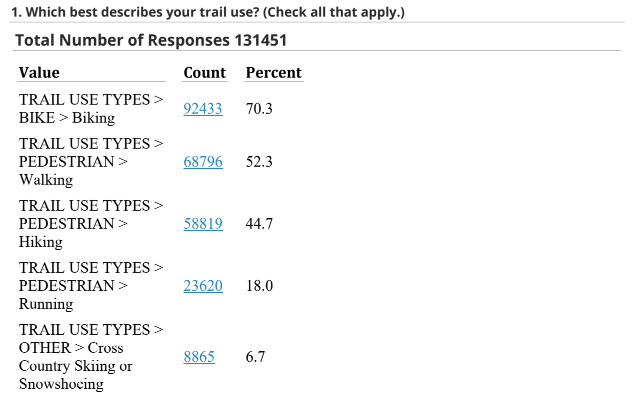
- Assessing app reviews for iOS and Android to pull out common themes of frustration and suggestions.
- Reviewing the NPS and previous survey data to pull out similar themes for the web site.
- Surveying current users to drill down into the more common themes for more detail, including open questions to obtain specific qual feedback.
- Analysing the heuristics of the core journeys and major feature journeys mentioned by users as being problematic. Uncovering larger issues around main app navigation, search and map functionality to be addressed and future-proofed.
- Querying paid subscribers for feedback on subscription based features, their awareness and usage of those features.
Product roadmap building
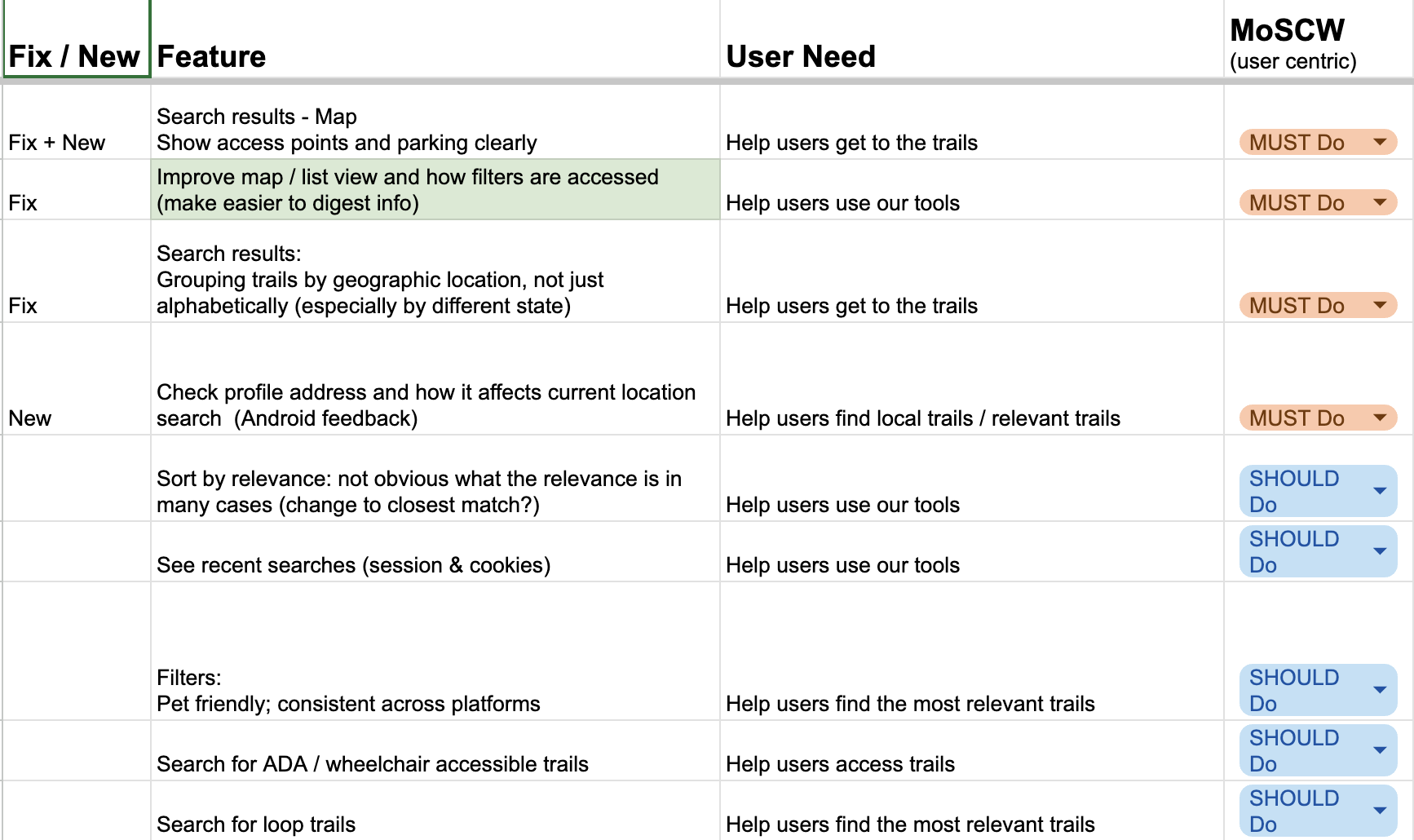
- Collating the top UX issues and aligning them with the main business priorities, specifically issues that directly affected revenue via their subscription tiers (Search and Map functionality rose to the top).
- Creating a MoSCOW map of features and outcomes and collaborating with the team and their tech partners to further refine and prioritise by tech feasibility and sequencing.
Solving the big problems first
- Facilitating workshops with the team on how to best solve the problems and to reveal and cross-team coordination or dependencies
- The major areas that were to be tackled:
- Many search issues (ie. consistent filters across platforms, map functionality, addition of new filters)
- More helpful suggestions related to search (ie loop trails, trails near to their location)
- Helping users to identify and use premium subscription features, especially for map functionality, to improve subscription uptake and retention.
- Helping users access offline maps
- Suggesting ways to increase engagement time, especially in maps on app (ie more map features, better "cross-selling" of trails & curated content, trip builders, and fixing or removing broken / lesser used features)
- Designing and testing the user flows via Figma wireframes and prototypes to send to internal users for evaluative feedback. (no budget for typical user testing, so mostly internal users + trusted friends and family)
- Briefing and collaborating with tech partners before any designs were "signed off" to ensure feasibility or to agree sequencing
DESIGNING AND TESTING THE SOLUTIONS
These are just a small representation of work.
(As the app has yet to be released, this information is still sensitive. More information and views of specific journeys can be given during an interview presentation.)
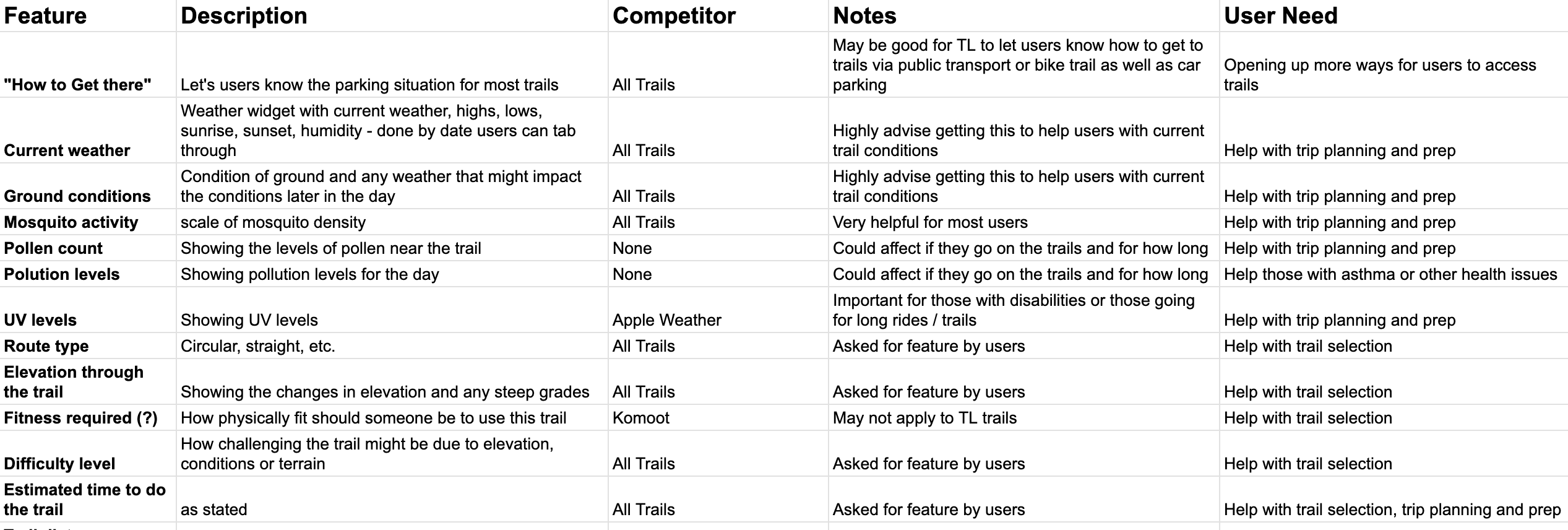
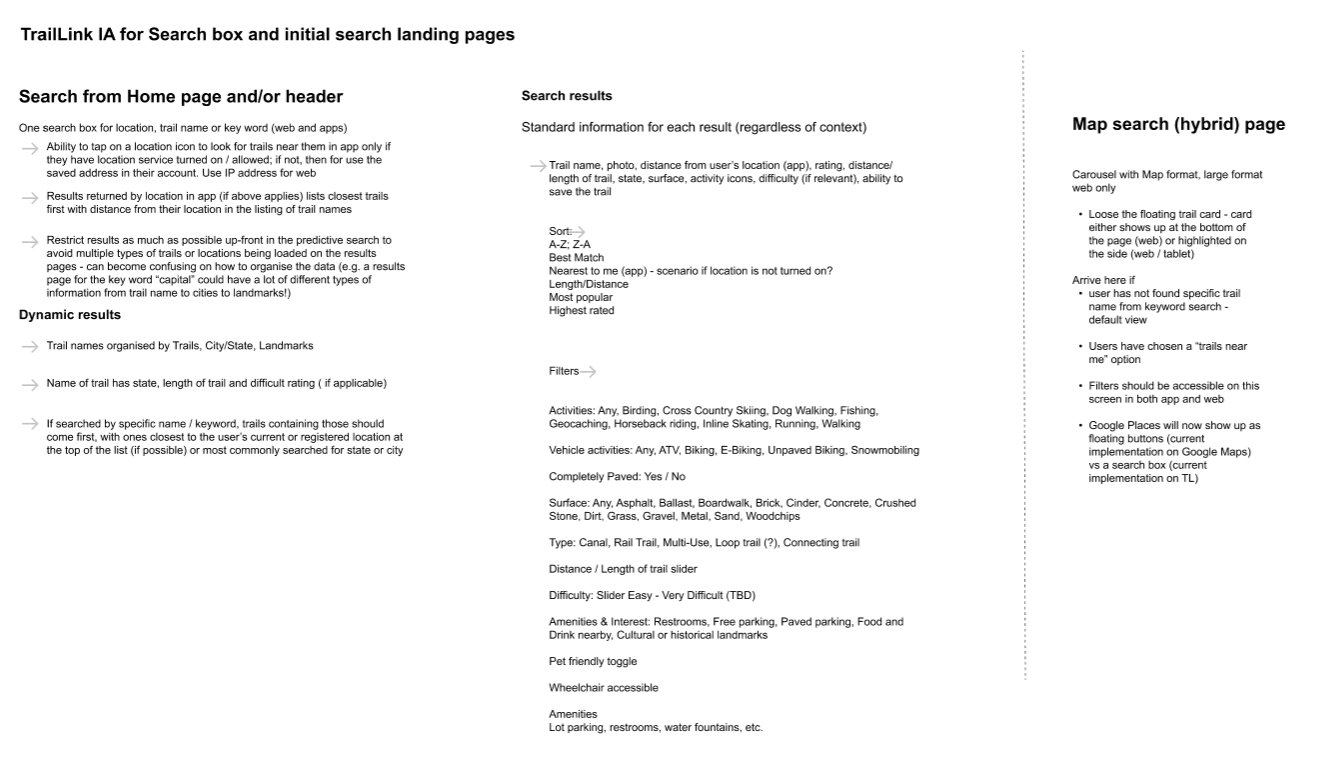
- This IA work was the starting point for scoping out the breadth of work, feasibility conversations, the sequencing from a technical POV and kicked off a service design piece around what information we could get from the local municipalities about trail amenities, conditiions, etc.
- From this doc came user flows, testing considerations and user data interrogation to prioritise which improvements and new features would be the most engaging for TrailLink's users.
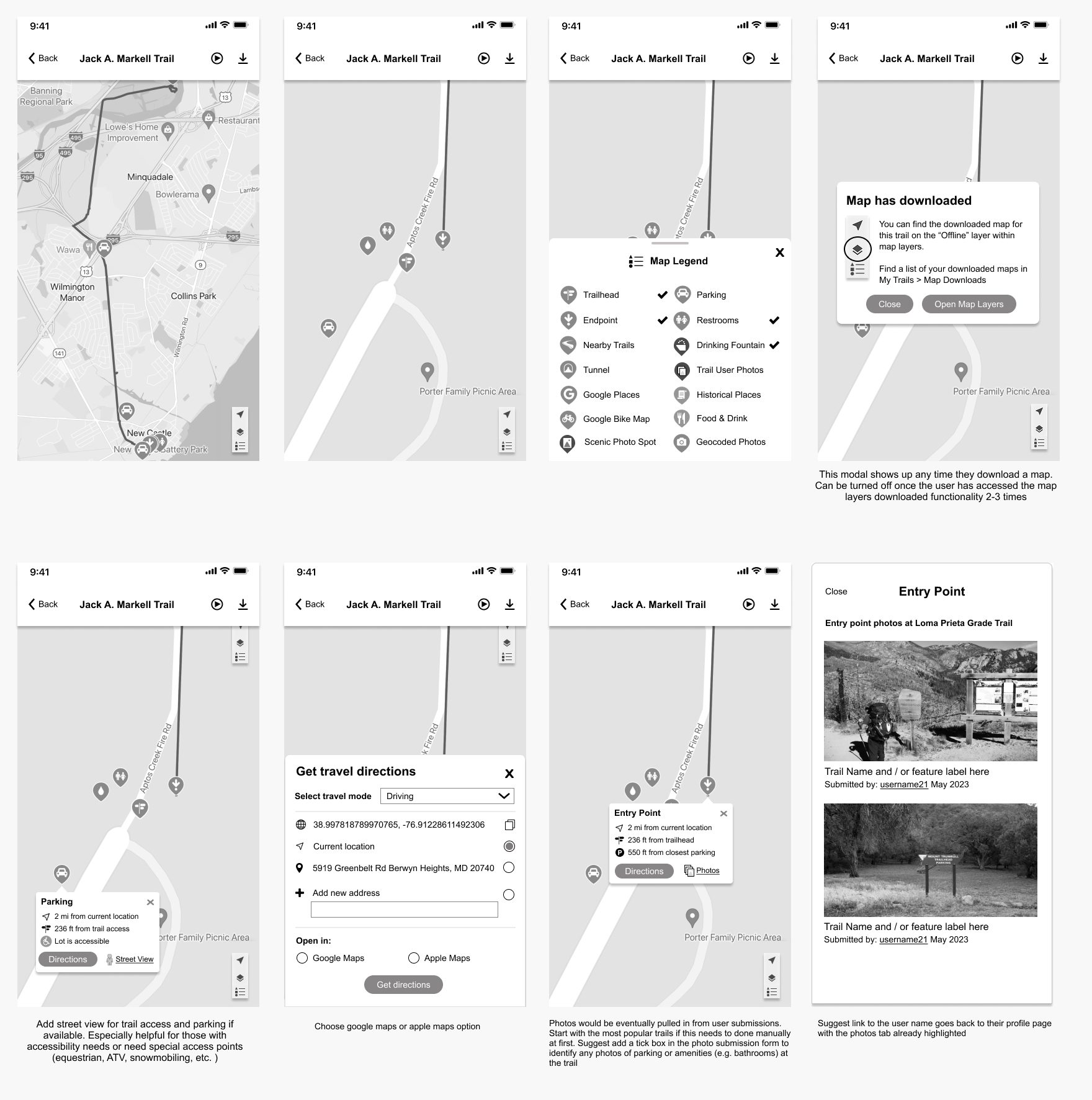
Example: Specific Trail Map Experience
The objectives were to:
- Improve marker placement within maps
- Highlight more local ammenities, additional trails and points of interest
- Improve driving directions, location and visibility of trail access points, accessibility information and parking information
- Make the location of downloaded maps far more visible and accessible
(More extensive information, screens and prototypes can be shown within an interview setting)
KEY HIGHLIGHTS AND FEATURES
As the app has yet to be released, this information is still sensitive. But broadly:
For Maps
More up front information on the trails, how to access them in real time and location, their related condition (e.g. weather or construction related issues), more features for them to track progress or link with other health apps, and more opportunities for users to build community by adding photos users would find helpful when on the trail.
For Search
More extensive filtering to accommodate a larger host of activities, abilities and accessibility needs. Better geographic radius targeting, visibility of trail conditions and activities and tools to help with journey planning.
(More information and specifics can be given during an interview presentation. Please contact me for more information.)
RESULTS
Coming soon - waiting for the app to be released!
WANT MORE DETAIL?
This is just the topline . I am happy to go into more relevant detail. Just contact me and let me know which areas you'd like to know more about.
Other Projects


Location
London, UK
Copyright
2025. All rights reserved.